


Need Help?
Contact Us


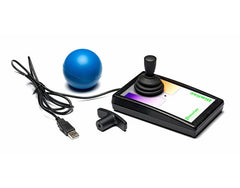
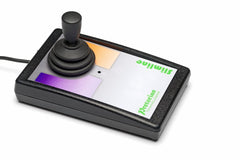
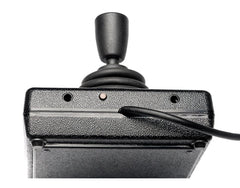
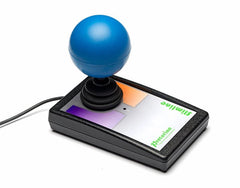
Before you do, remember, we are a not for profit CIC. Another store may be slightly cheaper, but every penny spent with us helps children with disabilities.
A compact, low-profile assistive joystick for smaller hands, with adjustable cursor speeds, programmable touch buttons and two external switch sockets.
VAT: Our prices are primarily displayed without VAT (Value Added Tax), as many of our customers qualify for VAT exemption due to disability. To benefit from this, simply complete a VAT exemption form, and we will refund the VAT on your first order. For future purchases, please create an account so we can update your account to VAT exempt status, ensuring that VAT will no longer be applied at checkout. If you are not eligible for exemption, VAT will automatically be added during checkout.Please note: that some products are VAT exempt by default.
Please Note: These products are sold with their intended purpose as described. We cannot be held responsible for any misuse of items where physical force has been used to damage the product or where it had been used in a manner that it was not designed for. If in doubt of its suitability, please get in touch.
The Pretorian Slimline Joystick is a compact, low-profile alternative to a standard computer mouse. Designed especially for smaller hands, it provides comfortable and precise cursor control for children and other users who find a conventional mouse difficult to operate.
With a palm-rest height of approximately 22mm, the hand can rest close to the desk while operating the joystick. Four adjustable cursor-speed settings allow the movement of the pointer to be matched to the user’s control, accuracy and preferred pace.
Two touch-sensitive buttons can each be programmed independently to perform a left click, right click, double-click or drag-lock. The light-touch buttons also provide optional audible feedback, helping the user recognise when a command has been activated.
Two 3.5mm sockets allow the touch buttons to be replaced with external assistive switches when required. This is particularly useful when the switches need to be positioned around the user’s most reliable movements or when leaning across the unit could activate a touch button accidentally.
| Function | What It Does |
|---|---|
| Left Click | Performs a standard left mouse click |
| Right Click | Performs a standard right mouse click |
| Double-Click | Performs two rapid left clicks from one button activation |
| Drag-Lock | Allows an item to be dragged without continuously holding down a button |
Please note: Tablet compatibility depends on whether the device supports an external USB mouse. A suitable USB adaptor may be required and is not included. External assistive switches are available separately.
If there are any supporting files or resources, they will be listed below.
This item is shipped directly from the supplier, please allow extra time for delivery.
Some suppliers may not ship large items to areas such as Northern Ireland, the Shetland Islands, Isle of Man, Jersey, or Guernsey. If they do, there may be an additional cost. Please contact us before placing your order.
Thanks for subscribing!
This email has been registered!
Please don’t include payment-card details. Guest order checks require your order number and matching email or postcode.


